



TL;DR: Starting a self-hosted WordPress blog will cost you $20–36 to launch (domain + hosting + free email tool), not the $2,000 “guru bundle” everyone’s trying to sell you. Nice-to-have upgrades — templates, stock photos, SEO tools, scheduling apps — can run you anywhere from $50–300/month once you’re actually making money and ready to level up. Skip the paid ads, the $2K courses, and the subscriptions you forgot you had until you’ve got a real offer and traffic to back it up. Bottom line: blogging is genuinely one of the cheapest businesses you can start. The real cost isn’t money — it’s whether you actually show up and do the thing.
- You can launch for less than $40, not $2,000. Domain, hosting, website builder, and a free email platform are genuinely all you need on day one. Everything past that is an upgrade, not a requirement — so stop letting “I need more money first” be the excuse.
- Your spending should match your business, not your Pinterest board. Premium templates, stock photo memberships, and fancy SEO tools are great — once you have traffic and income to justify them. Buying the “serious blogger” toolkit before you’ve published 10 posts just delays you actually writing them.
- Paid ads and $2K courses are for later, not launch day. Ads need a funnel, an offer, and proof people already want what you’re selling — none of which exist on day one. Save the big spending for when you’ve got traction to protect, not hope to buy.
New bloggers often fall into one of two categories: the “I’ll do it free forever” crowd and the “I’ll spend 2k on a course when I haven’t even published a first post yet” group. Listen here, I triage ICU patients for a living. Trust me when I say, I know the difference between “This needs attention right now” and “This can wait”. We’re going to apply this to blogging and figure out just how much it actually costs to start a blog in 2027.
I promise this blog post will deliver real numbers for how much it actually does cost to start a blog, not just some “it depends” rubbish. Real numbers for the bare minimum to get started, as well as things that are nice to have.
Disclaimer: This post may contain affiliate links. If you click on them, I may earn a commission, at no additional cost to you. See my disclaimer page for more information.
You Need a Self-Hosted WordPress Blog
This blog post explains what you need to start a self-hosted WordPress blog, because in my experience, WordPress is the best option if you want to start a blog and make money from it. Here are a few of my reasons for believing this way:
With a self-hosted WordPress blog, you completely own all of the content and files on your website. Because of this, you have full control, and you can easily switch hosting platforms as you wish. By contrast, Squarespace and Wix lock your website into their proprietary systems, making it difficult to leave.
Self-hosted WordPress blogs also allow for deeper SEO optimization, as you get to download helpful SEO plugins like RankMath, which tell you exactly what you need to do to improve your SEO rankings. Squarespace and Wix provide surface-level SEO tools, but they lack advanced technical optimization.
In addition to RankMath, the number of available plugins for a self-hosted WordPress blog is limitless. You have access to plugins to add security features, marketing tools, and more to your blog. Squarespace and Wix have closed frameworks with very few third-party extensions.
Lastly, and this might be the most important reason to choose a self-hosted WordPress blog, is that Squarespace and Wix take a percentage of all the sales you make on your website. With self-hosted WordPress, you get to keep every single cent you make.
With these things in mind, everything that I recommend in this blog post is what you need to start a self-hosted WordPress blog, because it is what is most beneficial to you. Let’s start with the bare minimum you need to have and pay for to launch your live blog.
The Bare Minimum Cost to Start a Blog
A Domain
So your domain is your website’s equivalent to a physical address. I purchased my domain from Namecheap because it was the cheapest vendor I could find. I paid $9.16 USD to initially register my domain, sarahgracevogler.com. I pay about $17-$20 annually to renew my domain.
Total cost to start: $9
Web Hosting
You need web hosting so you have a place to store your website files. You basically pay to rent space on a server to store these files, so people on the internet can access them at any time. I use the website builder Showit, and its monthly pricing plan includes hosting in the cost. If you choose to go with the Showit platform, you’ll, at the very least, have to buy a plan that includes blogging, since starting a blog is what this article is about.
The basic Showit plan with a basic starter blog is $27/month. I recommend Showit for both beginners and experienced bloggers because of its ease of use and the creative freedom it provides. But Showit is not a must-have to start your blog. The must-have is web hosting. You can buy a good hosting plan from Bluehost for as cheap as $3.99/month.
Total cost to start: $4-27.
Word of warning: no matter what hosting option you decide to go with, I highly recommend NOT choosing a shared hosting plan. In shared hosting, multiple websites share the same server and its pooled resources. This type of hosting plan is cheaper because it is shared, but it also means your site is slower because it is shared. Just don’t do shared hosting.
Website Builder
Unless you are a web design expert with knowledge of code, you need a website builder to make your website look the way you want it to. Popular website builder options include Elementor ($5-15/month) and Divi ($7.42/month). I’ve used both, and they really helped me when I was a brand-new blogger and had no idea how to design websites on my own.
But now that I have tried Showit, I wish I had just started using that from the beginning. I feel this way because with the time that it took to learn Elementor and Divi, and to migrate my website from one platform to the other, and then to Showit, I really wasted a lot of time that I could have avoided if I had just gone with Showit to begin with.
Total cost to start: $7-27 (Remember, Showit’s monthly plan price includes web hosting and the website builder in its cost, so you don’t need to account for Showit’s cost one time in this cost lineup).
THE VERDICT IS: For both web hosting and a website builder, I recommend Showit. You can even try it for FREE for 30 days to see if it is the right fit for you.
Email Marketing Platform
I recommend starting to grow your email list and email marketing from day one. Is it an absolute necessity? No. But Kit has a free plan that you can use for email marketing, as long as you have under 10,000 email subscribers, so it is the best option for beginners. Total cost to start: $0.
Total Cost to Launch Your Blog with the Bare Minimum $20-36.

The “Nice-to-Have But Not Day One” Cost to Start a Blog
A Premium Template or Theme
Okay, so Elementor got the job done when I was a beginner blogger and had no idea how to design a website. That platform was the first one I found that really allowed me to design my website the way I wanted. Technically, it worked. But I wish I had a screenshot to show you how terrible it looked. Meaning, your first website design attempt probably isn’t going to be good. And it’s probably not one that you want to be the face of your blogging business forever.
So once you figure out what you’re doing, and maybe have saved a little more money since you started your blog, you can work towards buying a beautiful, conversion-focused website template to really show off the professionalism of your brand. I recommend heading on over to my Showit website template shop when you are ready to switch to that more professional website look.
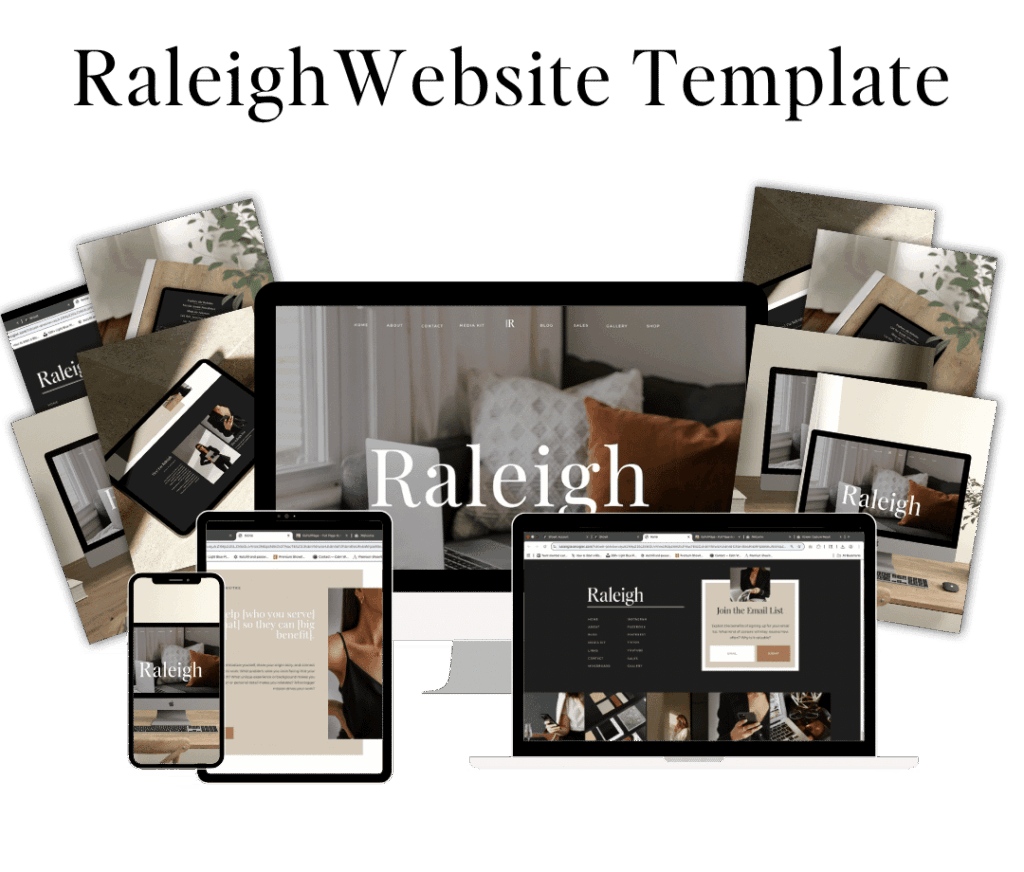
Some Showit template shops charge over 1K per template, and to me, this is just asinine. This was the whole reason I created my template shop: to make Showit templates more affordable. My templates run anywhere from $150-$400. For a template that costs more than this, you really need to decide if it is worth it. Don’t go into debt over a template.
Total cost: $49-$695+
Stock Photos/Canva Pro
When you are first starting out as a blogger, free stock photo websites are a good option to give your blog some visual appeal without the price tag. But once you become a serious blogger, using the same stock photos that everybody and their mom is using (because they are free!) isn’t the ideal look you want to go for. Many more serious bloggers invest in a stock photo membership, like Elevae ($199/quarterly), or Styled Stock Society ($45/month).
This isn’t about being too good to use free stock images. As you and your brand grow, your website needs to reflect the caliber of your work so people respect you as a professional. If your website looks like hell, people are going to assume that’s the kind of product/service you deliver too.
Elevae and Styled Stock Society prevent this by offering STUN-NING images for every different niche. But stock photos aren’t the only area that needs to improve as you grow. So do the graphics that you create, which brings me to a Canva Pro subscription ($18/month). I’ve had Canva Pro for as long as I can remember because I don’t like my design potential being limited. Canva Pro is easier for non-designers and a cheaper option than Adobe products.
Total cost: $18-$66/month
Scheduling Tools for Social Media
I am a firm believer that these tools are helpful for marketing your blog. I have ADHD, and with that comes days that are high energy and some that are low energy. I have to get my work done on the high-energy days, because when the low-energy days come, it ain’t happening. So I use my high-energy days to batch-create Pinterest pins and Instagram posts, and I use a tool to schedule those posts ahead of time so I can set it and forget it.
The most popular scheduling social media tool is likely Tailwind. I have used it before, and I really liked its feature that recommends the best times to post for your audience. Tailwind is also an official Pinterest partner, so it doesn’t penalize you for using it to schedule posts on that platform. But if you want to schedule more than 5 posts per month (which I HIGHLY recommend that you do; 5 posts are more of a daily goal than a monthly goal), you’ll have to pay at least $14.99/month.
There are other social media scheduling tools out there, but you are going to have to pay a premium price for them too. BUT, if you already have Canva Pro that I mentioned above, you can use it to schedule your social media posts ahead of time, and this is what I use, so I am not paying ANOTHER monthly subscription fee for something. Canva Pro is $18/month. Tailwind starts at $17.99/month, but it depends on what tool you choose.
Total cost: $6-$29/month
SEO Tools
SEO tools can help improve visibility, rankability, and analyze your competitors. Take this recommendation with a grain of salt, though. SEO is still important in 2026, but GEO (Generative Search Optimization) must also be considered now, and standard SEO tools haven’t caught up with the latest GEO standards. I still think having an SEO tool is valuable, though.
I use Ahrefs, and I like it because it tells me everything that is wrong with my website with its site audit feature, from photos missing alt text to broken links. I can also use it for keyword research and keep an overall check on my site status. I use the starter plan at $29/month because I’m not going to pay more than that for an SEO tool.
Total Cost: $29-$199/month
A Productivity Tool
A lot of productivity tools like Trello, Notion, Airtable, etc. have free plans. So if you are just starting out, go with the free option, especially until you figure out which tool works best with your brain.
As you get more into your business and need more things organized, like SOPs, content ideas, affiliate links, collaboration details, and more, you may find the free plans for these productivity tools to be too restrictive. For example, I love using Trello, but the free plan only lets you create 10 boards. And nothing is more ridiculous than using 70 tools to stay organized, just because the ones you want to use limit your storage space. I want all my business information in one tool, and I don’t want to be limited in how much information you can store/organize in it.
Total Cost: $5-$10/month
AI Subscription
AI software all offers a free plan, but they limit the number of queries you can search for. I don’t use AI to write my content, and I recommend you don’t either. I primarily use it for idea generation, for both products and content. A lot of times, I have to tweak my inputs to get the outputs that I want, and it takes me several tries to get it right. So I purchased Claude Pro for that reason.
And I also trained Claude Pro to make the outputs sound more like something I would actually say, instead of some robot crap. You can’t really get personalized outputs like this with the free version.
Total Cost: $20/month
Email Marketing
I mentioned this in the first section and encouraged you to start out with Kit’s free plan. The problem with this free plan, as you grow in your business, is that it does not include automations in the free plan. The number one way that I grow my email list is by giving away freebie opt-ins, which are delivered automatically through my email marketing platform. This isn’t an option with the free email marketing plan. So while it’s fine to start with the free plan, you’ll need a premium email marketing plan if you want to grow your mailing list.
I have tried multiple email marketing platforms, and I currently use Flodesk. I chose this platform because it has the most beautiful emails of any platform that I have tried. Flodesk, like many other common email marketing platforms, has subscriber-based pricing, so the more subscribers you have, the higher the monthly or annual price. You can investigate monthly subscription prices on the various platforms by plugging in how many subscribers you currently have.
Total Cost: $7-$100+/month

The Money Pit – What People Buy Too Early
Paid Ads
Paid ads are an excellent way to get your offer in front of new eyes that might not have seen it otherwise. There is definitely a place for paid ads in your marketing. But not in the beginning. There are so many things that you need to have in place for paid ads to be effective, and if you start running them before you have the foundational work done, you’re wasting your money.
What you need before you start paying for ads:
- Website and branding
- Know your audience and have clear messaging for them.
- An offer
- You’ve already seen some traction from organic marketing, proving there is a need and desire for your offer.
- A sales funnel to your offer
Expensive Online Courses
Learning in blogging is a journey, not a destination. I believe wholeheartedly in learning more about your niche and marketing every chance you get, for as long as you are in business. There is never a time you should say, “Okay, I’ve learned enough. I can stop now.” Doing that will get you left behind.
But these online courses that people offer and charge thousands of dollars for… I haven’t found one that is actually worth that much unless they are going to do my marketing and sell my offer for me; paying thousands of dollars ain’t it.
Learn. Take online courses. Read books. But don’t lose money doing it.
Unused Subscriptions
Keep a record of everything you’re subscribed to, and check it regularly to make sure you are still using everything on that list. In addition, use discretion when signing up for subscriptions in the first place. Everyone wants you to sign up for their thing and makes it sound like the best thing since sliced bread. You don’t need everything that everybody and their mom is promoting.
Like the example I gave earlier, Canva is primarily known as a graphic design tool. Still, it can also connect to your social media accounts and let you schedule posts. If you already have Canva Pro, there is no point in buying a separate social media scheduling tool.
Look at the tools you already have, and make sure you are using all their features before you buy more crap.
| COST CATEGORY | BARE MINIMUM (LAUNCH TODAY) | NICE-TO-HAVE WHEN YOU’RE SERIOUS | ALL-IN (TREATING YOUR BLOG LIKE A REAL BUSINESS) |
|---|---|---|---|
| Domain | $9-20/year | $9-20/year | $9-20/year |
| Hosting | $4-27/month | $4-39/month | $4-39/month |
| Website Builder | $7-27/month | $7-39/month | $39/month (Showit, includes hosting) |
| Website Template | Free/default theme | $49-695+ one time | $150-400 (my shop) |
| Email Marketing | $0 (Kit’s Free Plan) | Subscriber-based | Subscriber-based |
| Stock Photos/Design | Free stock sites | $18-66/month | $18-66/month |
| Social Scheduling | Manual Posting | $6-29/month | $6-29/month |
| SEO Tools | Free (Google Search Console) | $29-100/month | $29-100/month |
| Productivity/Organization | Free plan (Trello, Airtable, Notion) | $5-10/month | $5-10/month |
| AI Subscription | Free tier | $20/month | $20/month |
| Legal/Compliance | $100-400 one time | $100-400 one time | |
| Monthly Recurring Total | $11-47/month | $78-277/month | $99-$1100+/month |
| Startup Total (Year 1) | $20-36 | $500-2000+ | $700-1200 |
Is This Worth My Money Framework?
Before you purchase anything on this list, run it through this framework first:
- Does it actually save me hours, or does it just look productive? Is this tool actually saving me time, or does it just make me feel more official? If the tool replaces your time, buy it. If it replaces your effort to start, that’s a red flag.
- Does it actually make me money, or does it just feel like it will? Is there a direct line from this purchase to a sale, subscriber, or traffic? Or am I just hoping it will convert? If you can’t draw a line from purchase to result in one sentence, don’t buy it yet.
- Am I solving this for today’s problem or a problem I don’t have yet? Like the example I gave earlier with the paid ads. If you don’t even have a funnel yet, there’s no point in buying ads. Buy for the business you have today and upgrade when you actually outgrow it.
So here’s the truth bomb I promised you at the top: starting a blog will cost you $20-36 if you’re doing the bare minimum, maybe a few hundred bucks a month once you’re serious about it. That’s it. That’s the whole “secret.”
You do not need the $2,000 course. You do not need to run ads to an offer that doesn’t exist yet. I know because I’ve bought half this stuff in the wrong order myself, and I’ve got the wasted money to prove it.
In the ICU, we triage. We figure out what needs attention right now versus what can wait, and we don’t waste resources on the thing that isn’t actively trying to kill the patient. Your blog budget works exactly the same way. Domain, hosting, a way to build your site, a free email tool — that’s your patient’s vitals. Everything else is optional monitoring you add once things are stable.
Here’s what nobody wants to tell you, though: the real cost of starting a blog was never the money. It’s showing up when you don’t feel like it. It’s hitting publish on a post that isn’t perfect. It’s doing the unglamorous, unsexy, nobody’s-watching work of consistency while you wait for it to compound.
You can buy every tool on this list and still not have a successful blog. Or you can start with $20, a domain, and actual grit, and build something real.
Like this post or want to save it for later? Pin the images below to Pinterest ⤵️


Hey, I’m Sarah Grace—an ICU registered nurse, and I bring the same no-BS problem-solving to blogging. I’ve been blogging since 2020, and I’ve also earned certifications in digital marketing and graphic design since then.
I help bloggers turn their hobby blog into actual income with my How to Start a Blog online course. I also design Showit website templates and specialize in custom web design for bloggers and creatives.
I’ve been where you are and I learned how to blog for income the hard way, so you don’t have to. Now I teach others how to do it with clarity, confidence, and heart. Grab my free Website Blueprint to see what elements your website needs to increase conversions.
02
Sep


VIEW THE COMMENTS
Add A Comment